From cancellation to confirmed appointment
ShowUpIQ adds an intelligent recovery layer to your existing scheduling process — no CRM replacement, no new booking system.
Book a personalized walkthrough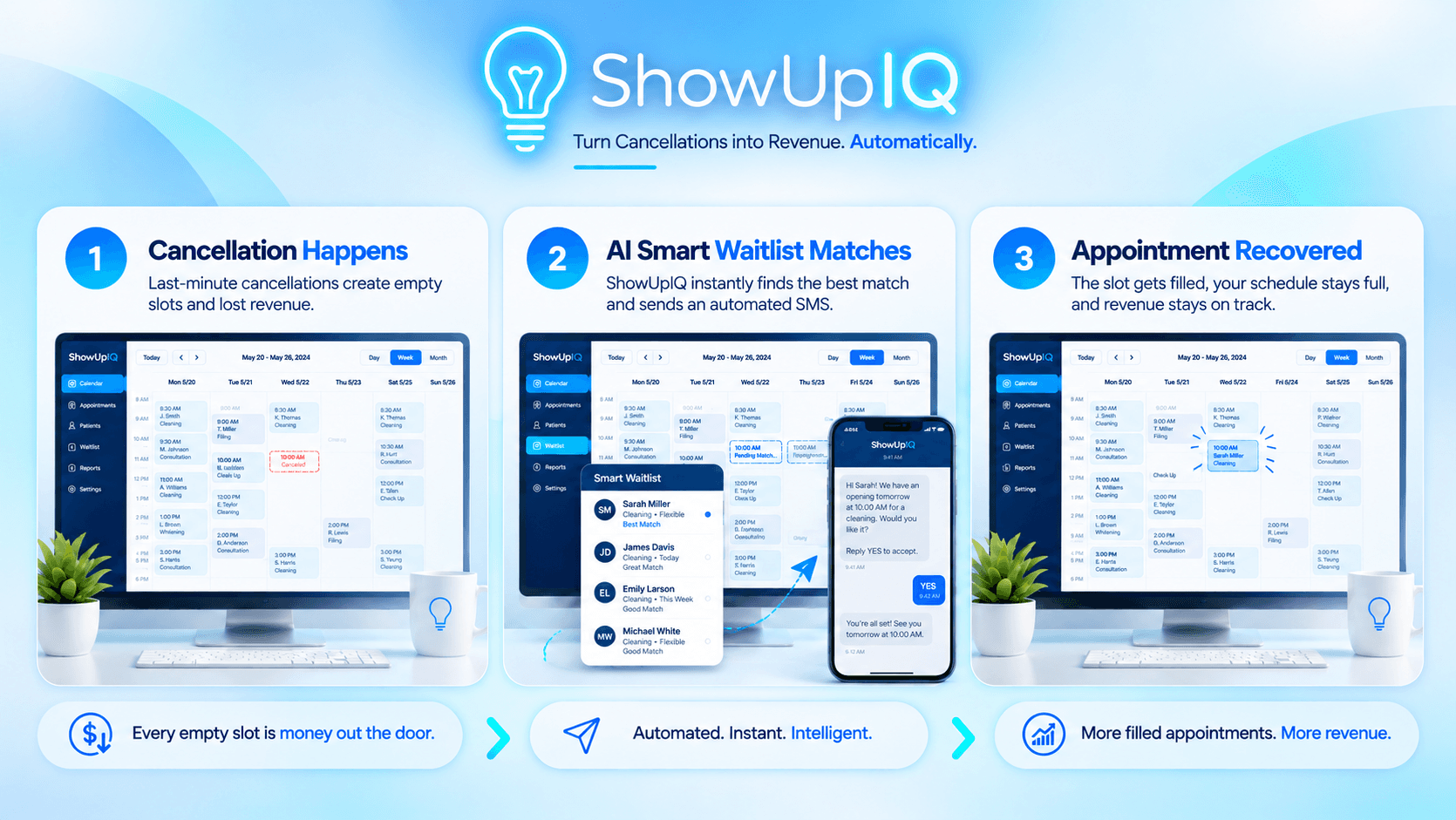
How it works
- Connect your scheduling workflow. ShowUpIQ connects to your existing booking or scheduling platform through an available integration, custom workflow, webhook, or API connection.
- Detect appointment openings. When someone cancels or reschedules, ShowUpIQ identifies the opening.
- Identify qualified matches. The system reviews your waitlist based on your selected rules.
- Send automated SMS messages. ShowUpIQ contacts qualified people without requiring your team to call each person manually.
- Confirm the appointment. When someone accepts, the appointment updates through the connected booking workflow.
- Track the result. Review the recovered appointment and estimated revenue impact in the dashboard.
Ready to Stop Losing Revenue to No-Shows?
Turn empty appointments into recovered revenue with automated reminders, smart waitlist matching, and measurable results.